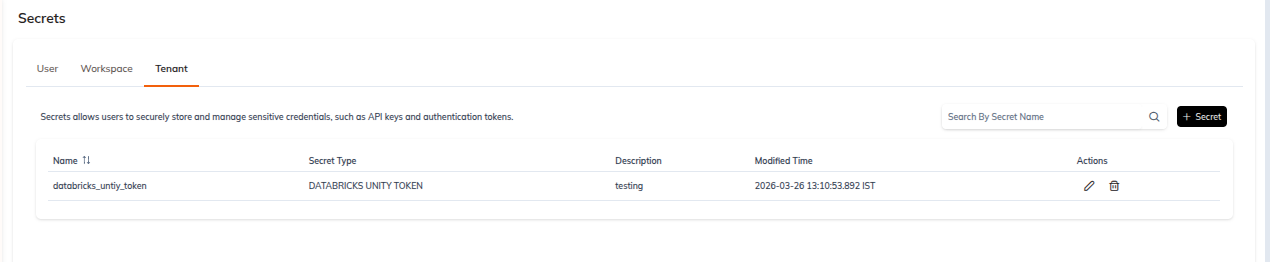
Tenant-Level Secrets
Tenant secrets belong to the tenant and any user in that tenant can resolve them. That reach is the whole point of the scope: a metastore credential or a storage credential that every workspace legitimately needs shouldn't have to be recreated in each one, and it shouldn't be tied to the individual who happened to configure it first.
It's also the reason this scope deserves more care than the other two. A secret readable across an entire tenant is a secret whose blast radius is the entire tenant, so we'd suggest reserving it for shared infrastructure credentials and keeping anything narrower at workspace or user scope.
List
| Route | /tenant/<tenantId>/secrets/tenant |
| Toolbar | Search By Secret Name field with a search icon, and a + Secret button at the top right |
| Empty state | No Tenant Secrets Found. with an illustration and a secondary + Secret button |
Columns: Name, Secret Type, Created By, Modified By, Created Time, Modified Time, Actions. Every column except Secret Type and Actions is sortable.
The Actions kebab menu holds exactly two entries, Edit and Delete.
Create
| Route | /tenant/<tenantId>/secrets/create-tenant-secret |
| Breadcrumb | Secrets ❯ Tenant ❯ New tenant secret |
| Footer | Reset and Create |
Basic Details on this scope are Secret Name (required), Secret Type (required, defaults to ENVIRONMENT VARIABLE) and Description. There's no Workspace field on the tenant-scoped form.
All seven secret types are available at this scope. See Create Secret for the per-type field matrix.